
You find a job that looks right. Then the busywork starts: copy the posting, open another tab, paste it in, dig up the right resume, and work out whether you're a fit before you sink half an hour into the application. The Ready to Apply Chrome extension does that first part for you.
Most people don't have that half hour. In Monster's 2026 survey of 1,001 US job seekers, 68% said they spend less than 30 minutes tailoring a resume for each application. And postings keep growing: Greenhouse found the average job description got 7.4% longer between 2022 and 2026, and Indeed counted 14.3% more words per post between 2021 and 2025, Korn Ferry reported. In my years working in recruitment, writing job ads is actually one of my specialties. I've written hundreds of job ads, manually without the help of AI, for countless agency client requisitions. In the last few years after ChatGPT was released to the world, the trend shifted. Job ads are now generated by AI, stuffed with keywords and value props that oversell the hiring company's mandate, hence job ads are now longer and wordier than ever.
So I built a shortcut to the question that should come before any application: you find an attractive job posting but then you ask, should you even apply? The extension answers it from the page you're already on.
What Is the Ready to Apply Extension?
The Ready to Apply extension is a browser extension for Chrome and Microsoft Edge, free to install. Click it on a job posting and it finds the job's title, company, location, and description, then opens your Fit Score on readytoapply.ai with the posting already filled in.
Here's what you get:
- One click from a job posting to your Fit Score, with the posting already filled in.
- Your resume comes along too. Save up to 10 versions in the extension and pick the right one for each job.
- Long postings handled: pick the parts that matter when one runs past the Fit Score's 1,500-word limit.
- Free to install. Each Fit Score uses 1 credit, the same as on the website (see our pricing).
Why I Built It
Every job you look at comes with a hidden cost. Before you can decide, you have to move the posting from one tab to another, find the right resume, and read both closely enough to judge the match. Do that for ten jobs a week and it adds up to hours.
That cost pushes people into one of two bad habits. Some stop checking and apply to everything that looks close. Others spend a whole evening on one application they were never a fit for. I've talked about the former in detail in this blog post. Either way, the time and energy go to the wrong jobs.
The Fit Score already answers the fit question. It scores your resume against what the job actually asks for, the way a recruiter decides who makes the shortlist, with the evidence behind every point. The extension clears away the busywork in front of it, so the check is fast enough to run on every job you're serious about.
The Age of Job Slopplication
There's another kind of shortcut, and it's making the job search harder on both sides of the desk.
Auto-apply tools fill in and submit job applications for you, in bulk. One deal listing promised you could "apply for 1,000 jobs at the same time". You set a few filters, press start, and the software sends your resume to hundreds of jobs in an afternoon, whether you'd want them or not. I recently saw an Instagram ad for an auto-apply startup, with a user boasting applying for 542 jobs in one go.
You can see it in the numbers. LinkedIn now takes in about 11,000 applications a minute, up 45% in a year, according to The New York Times. On Greenhouse's hiring platform, about 254 people apply to every job ad, and applications per recruiter are up 412%, Fortune reported in July 2026.
I call it job slopplication: applications sent because software made them free to send, not because anyone checked the fit.
It doesn't always pay off for the person sending them, either. In one widely shared case, a job seeker's bot sent about 5,000 applications and landed around 20 interviews, roughly half a percent. He'd gotten about the same number of interviews from a few hundred applications he sent himself.
The other side of the desk pays for it too. Every thoughtless application is one more that a recruiter, or a filter, has to get through before reaching the people who actually fit. So employers add more screening software, the bar goes up, and qualified people can get lost in the noise. Again, I wrote about that in our post on the AI application flood.
Ready to Apply is not one of those tools. Our goal is not to add to the problem and encourage mindfulness when applying for jobs. Automation is great when used correctly, like creating different versions of your resume for different jobs you're applying for, or quickly extracting the most important requirements from a job opening. What makes Ready to Apply different:
- It never applies for you. It doesn't fill in forms or click submit, and it never changes anything on the job site.
- One job at a time. Each Fit Score is a deliberate click, on one posting you chose to look at.
- It tells you when not to apply. Ready to Apply draws its line at 60%. Below it, the verdict says so plainly, and we don't offer to tailor your resume for that job.
- Fewer, better applications. Send only the ones you're a real fit for, and your effort goes where it can land. The recruiter reading it gets a candidate worth their time.
How Does It Work?
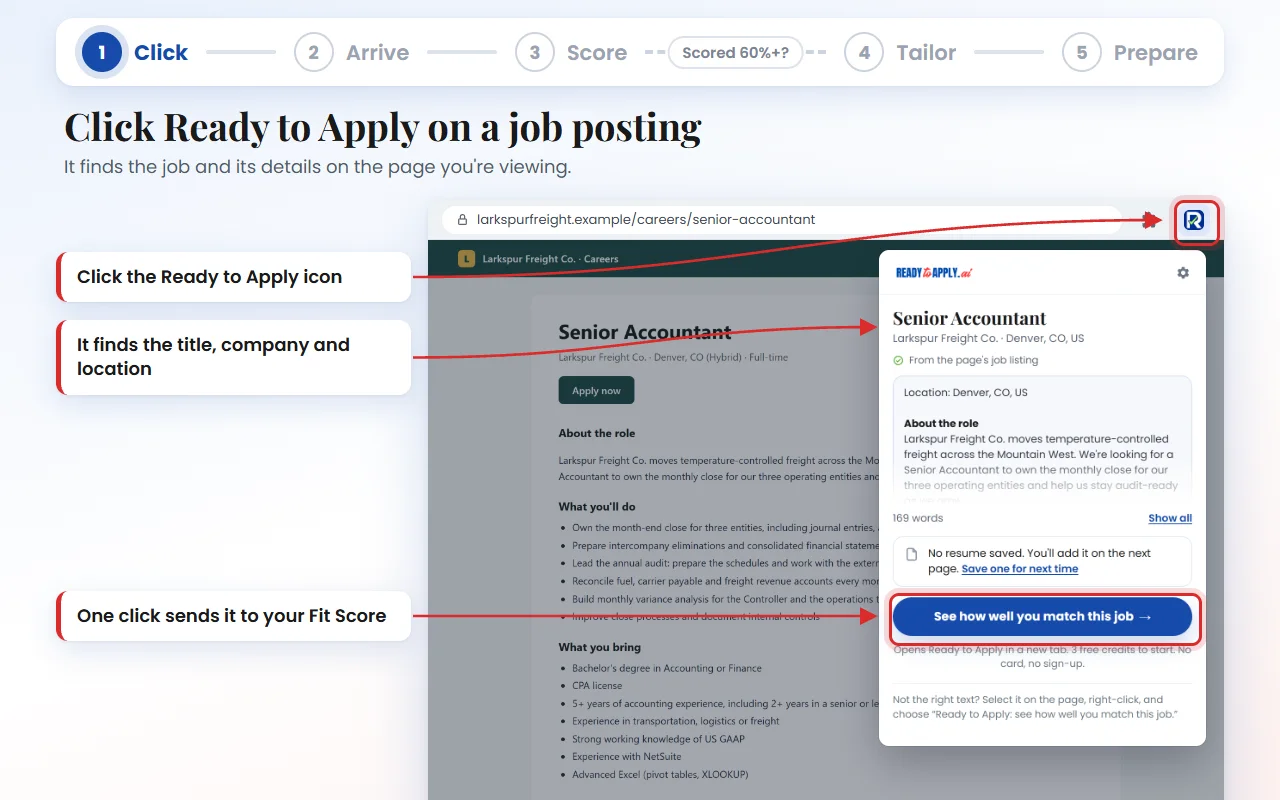
Open a job posting, click the Ready to Apply icon, and check what it found. One more click opens your Fit Score on readytoapply.ai with the posting and your saved resume already filled in. Once you've agreed to our terms in the extension, each Fit Score starts on its own after a short countdown you can cancel.
Click Ready to Apply on a job posting
Click the icon in your browser's toolbar. Pin it so it's always one click away. It shows the job title, company, location, and the description it found, so you can check them before anything else happens.
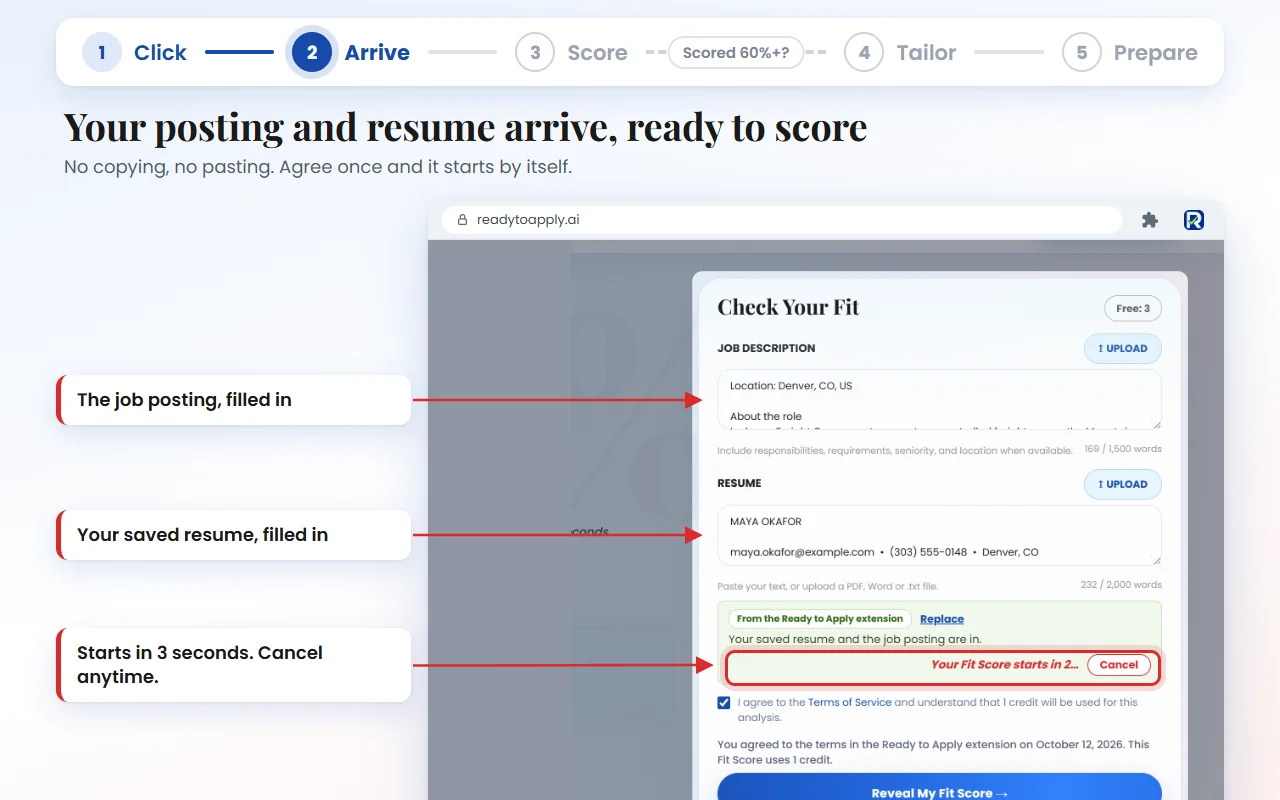
Your posting and resume arrive, ready to score
Click See how well you match this job. Ready to Apply opens in a new tab with the posting in the job description box and your saved resume in the resume box. If you've agreed to the terms in the extension, the Fit Score starts by itself after a 3-second countdown, with a Cancel button if you change your mind.
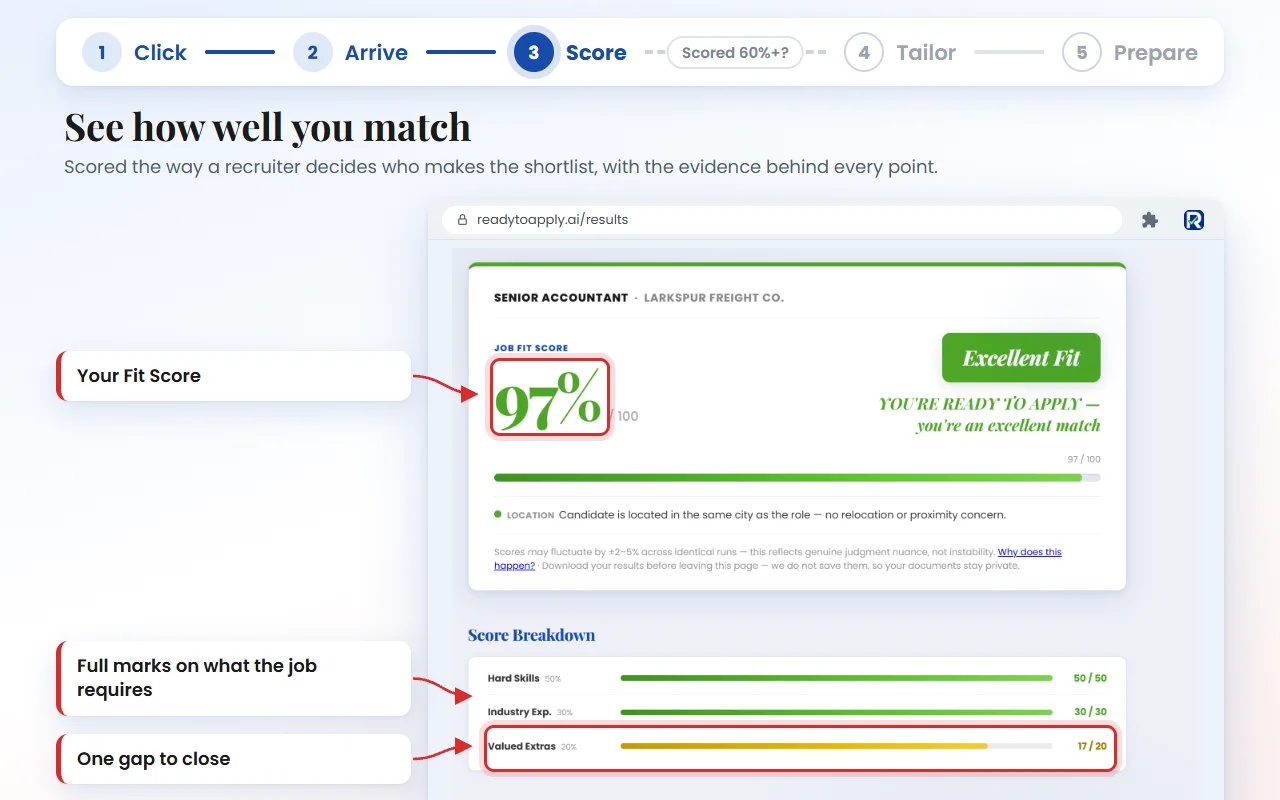
See how well you match
Your Fit Score shows what matched, what didn't, and what to fix, with the evidence for every point. Score 60% or higher and you can go on to Resume Optimization and Interview Prep for that job, at 1 credit each.
Some postings run long. When one goes past the Fit Score's 1,500-word limit, the extension shows you its sections, so you can keep the role, the responsibilities, and the requirements and leave out the company overview, the benefits, and the legal fine print.
Which Job Sites Does It Work On?
It reads postings on the major job boards, including LinkedIn, Indeed, Glassdoor, ZipRecruiter, Seek, Reed, Totaljobs, IrishJobs, and Workopolis, and on company career pages run on Greenhouse, Lever, Ashby, SmartRecruiters, and Workday. Anywhere else, select the job description, right-click, and send it.
Many job pages carry a standard description of the job that search engines read, and the extension uses it when it's there. When it isn't, it reads the posting the way you see it on the screen. If a page shows a list of jobs instead of one, it tells you to open the one you want.
For anything else, like a staffing agency's site or a posting someone sent you, select the job description, right-click, and choose Ready to Apply: see how well you match this job.
Your Resumes, Saved Where You Keep Them
Most people don't have just one resume. You might have one for operations roles and another for project management, or a version you cleaned up last week.
The extension keeps up to 10 of them, each with a name you choose and the date you saved it. The popup shows the three you've used most recently, so you can pick the right one for each job. Right-click sends the one you used last. You can rename, download, or delete any of them in the extension's settings.
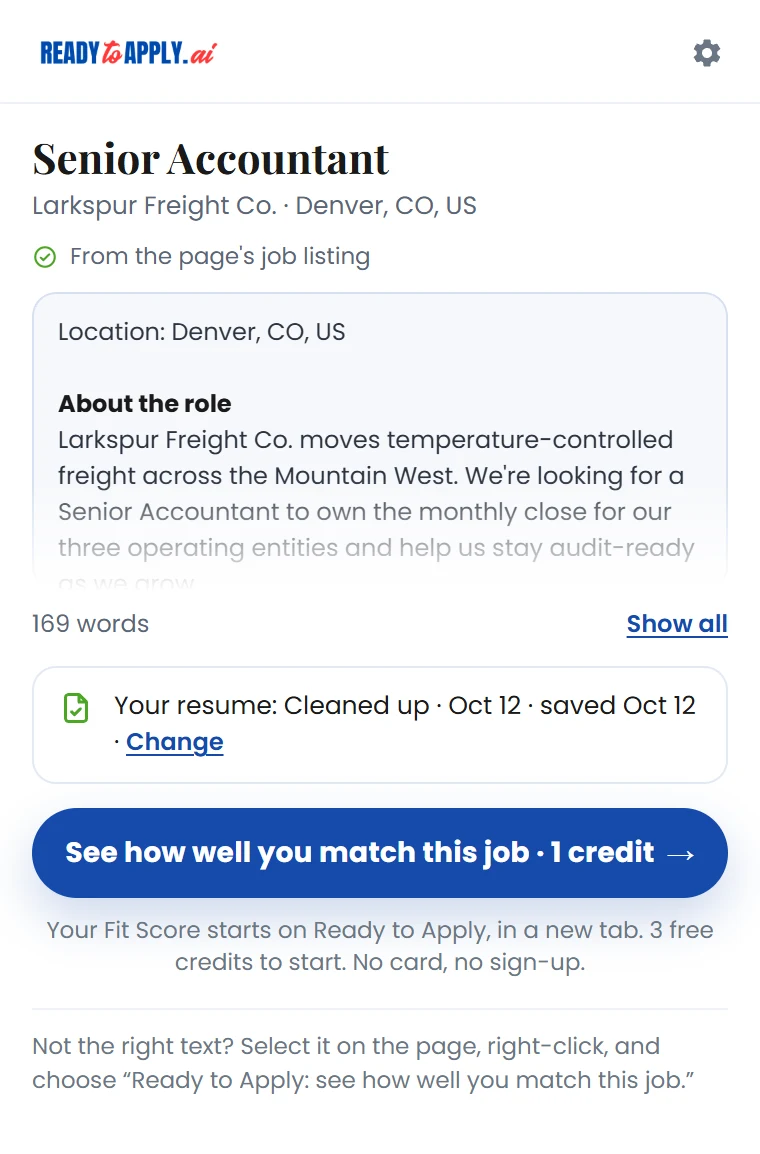
If your resume needs work first, run it through Resume Cleanup, free, always, with no job description needed. Then, on that same page, open the extension and save the cleaned-up version in one click. Matching it to one particular job? Our guide to tailoring your resume to a job description walks through it without inventing anything.
Is a Job Search Chrome Extension Safe to Use?
It depends on what the extension can see. Check the permissions it asks for, whether it reads pages in the background, and where your data goes. The Ready to Apply extension reads a page only when you click it, keeps your resumes on your computer, and sends nothing until you start a Fit Score.
Be choosy before you add any Chrome extension for job seekers. When Incogni looked at 442 AI-powered Chrome extensions in January 2026, 52% collected some user data, and 29% collected personally identifiable information. Some extensions can read every page you visit from the moment you install them.
Ours uses a Chrome permission called activeTab. It gets access to a tab only when you click the extension, and only for that page. That's why Chrome shows no warning when you install it. In plain words:
- We read a page only when you click Ready to Apply.
- It takes only the job posting from the page you click on: never your profile, your messages or your other tabs.
- We never change the page or apply for you.
- We don't see your browsing history.
- Your saved resumes stay on this computer, in this Chrome profile. They aren't synced, and nothing leaves your browser until you run the Fit Score. This choice enforces our commitment to your privacy.
- The extension itself sends nothing to our servers and has no analytics.
When you do run a Fit Score, the rules are the same as on our website. We don't keep your resume or the job posting. We keep your analysis, which quotes the parts of them it scored, for 12 months. Here's why we don't store your data, and our privacy policy has the details.
Does It Work in Edge, Safari, or on My Phone?
It works in Google Chrome and Microsoft Edge on a computer. A Safari version is coming soon. It doesn't run on phones or tablets, but you don't need it there: open readytoapply.ai on your phone and paste the posting into the Fit Score.
Chrome and Edge together account for about three in four desktop browser visits in the US: 60.8% and 14.8% in September 2026, according to StatCounter.
In Microsoft Edge, it installs from the Chrome Web Store. The first time, Edge asks you to allow extensions from other stores. Choose Allow, then install it as usual.
Using Safari? A Safari version is coming soon. Until then, the extension works in Google Chrome and Microsoft Edge on your Mac.
Before Your Next Application
Find a job, click once, and know where you stand before you put the work in. That's the whole idea.
It won't help anyone send applications to jobs they never read. It helps you pick the jobs worth your effort. Then it helps you make that effort count, with Resume Optimization and Interview Prep when your score clears 60%.
Add the extension, pin it, and run it on the next job that catches your eye.