"Hi, this is Riley from the recruiting team. We reviewed your resume and have a remote position open: $300 a day, flexible hours. Reply YES to learn more."
You never applied. You don't know a Riley. Here's how to know if a job is a scam when it shows up like this, with no posting to read at all. After weeks of job hunting, the number is tempting, and part of you wants it to be real. That's what the sender is counting on.
That message follows the pattern the FTC described in its April 2026 alert, titled "That job offer text is probably a scam". In May I wrote a guide to job description red flags, sorted into severe, hard, and soft signs. Everything in it still holds and is constantly evolving. This post brings it up to date, and introduces the free tool I built so you don't have to run that checklist from memory while a stranger waits for your reply.
Are Job Scams on the Rise?
Yes, and fast. Reports of job scams to the FTC tripled between 2020 and 2024, and the money people reported losing grew from $90 million to $501 million. The Better Business Bureau says job scam reports doubled again in 2025. And those numbers only count the people who reported it.
The FTC's figures come from its 2024 fraud data, and the BBB's from its 2026 employment scams update. The FBI sees the same climb. Its Internet Crime Complaint Center logged 24,688 employment fraud complaints in 2025, with $363 million lost, up from $264 million in 2024 and $70 million in 2023. In Canada, the Anti-Fraud Centre counted $50.6 million lost to job scams in 2025.
The real totals are higher. The BBB's study notes that only 4.8% of people hit by mass-market fraud report it to the BBB or a government agency. So if a message has ever made you stop and wonder, that instinct was worth listening to.
Why Scam Jobs Are Harder to Spot Now
The old picture of a job scam was a sketchy posting on a job board. That still happens: there are scam jobs on Indeed, LinkedIn, and every other big board. But the pitch now finds you, and it often skips the posting entirely.
- It arrives by text or chat. The FTC tells job seekers to ignore unexpected texts, WhatsApp, and Telegram messages about jobs. And one in three people who reported losing money to a job or business opportunity scam in 2025 said it started on social media.
- It feels like a game. In a task scam, you're paid to like videos or rate products. The earnings climb on a screen, until you're told to deposit your own money to unlock them. The FTC counted about 5,000 task scam reports in all of 2023, and about 20,000 in the first half of 2024 alone.
- It looks like a salaried job. A CBC News investigation followed 1,500 fake job ads to a global multi-level marketing scheme. The ad looks normal. Then comes a group session instead of an interview, and then a fee to "get started."
Each of these looks different on the surface, but each one breaks a rule that real hiring follows.
How Do You Know If a Job Is a Scam?
Look for what a real employer never does. Real employers don't charge you to get the job, don't ask for your SSN or bank login before an interview, and don't run the whole hiring process in a chat app. One warning sign is a question. Three together are an answer.
I spent my career on the other side of the desk. I've run hiring from start to finish: I wrote the job postings, decided whose resumes made the shortlist, ran the interviews, made the offers, and onboarded new hires. That's how I know what a real hiring process looks like. A scam has to break those rules somewhere, for example, a step that looks suspiciously out of order, and it usually does it in writing.
The May guide sorts those broken rules into three tiers. Here's the short version:
- SEVERE: stop. You're asked to pay to get the job, or to deposit money to unlock tasks. You're asked for your SSN, SIN or passport before any interview. The "job" is forwarding packages or money for someone else. Someone wants your banking login or remote access to your computer, or tells you to keep it from your bank.
- HARD: verify before you go further. The pay is far too high for the work. It's a business you pay to join, not a salaried job. A "company recruiter" writes from a Gmail address. You're offered the job without an interview, or the whole hiring process runs in WhatsApp or Telegram.
- SOFT: they matter when they cluster. Pressure to act today. No real description of the work. A message about a job you never applied for. An "information session" where the interview should be.
The rule underneath all of them is simple. Money flows from the employer to you, never the other way. Your own tools or a license exam can be real costs of a job; a fee paid to the "employer" is not. The FTC puts it plainly: "Don't pay for the promise of a job."
Knowing the list is one thing. Running it from memory at 11 p.m., with a stranger texting "are you still interested?", is another.
How Does the Job Scam Checker Work?
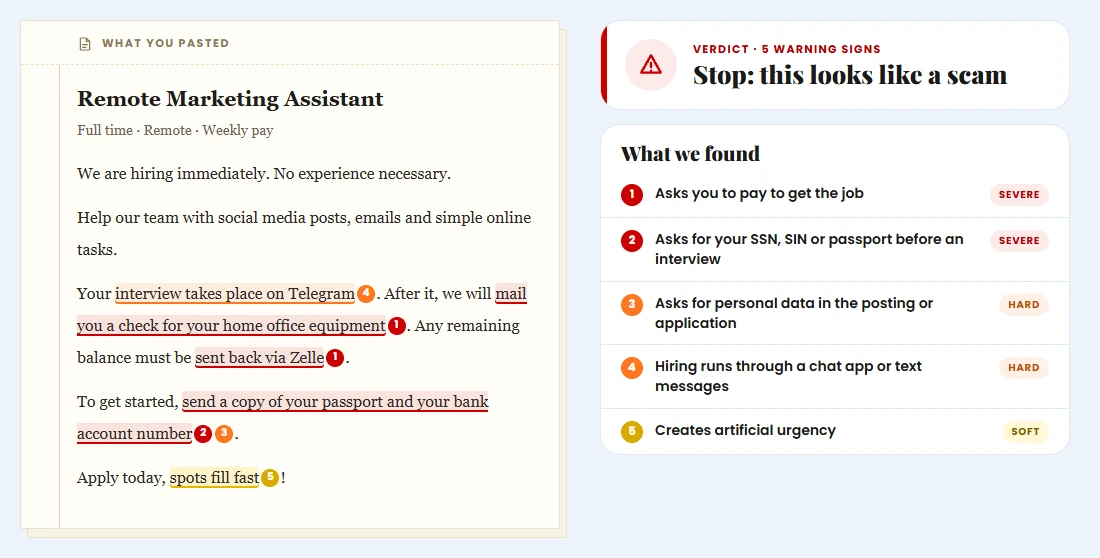
Paste a job posting or a recruiter's message into the Job Scam Checker. In about a second, it marks every warning sign on the text itself, quotes the words that raised it, and gives you a verdict, from "No red flags found" to "Stop: this looks like a scam."
The Job Scam Checker looks for 31 warning signs, sorted into the same severe, hard and soft tiers. Each one it finds gets a numbered mark on your text and a matching entry beside it, with the exact line, what it means and what to do next. The verdict follows the tiers. Any severe flag means stop. Two hard flags mean walk away or verify thoroughly. A soft flag or two on its own isn't treated as a problem.
It's just as careful about what it doesn't flag. Real jobs share plenty of words with scams, so these never count against a posting:
- an employer's own fraud warning, like "we will never ask you to pay"
- honest commission work with a base salary
- normal job costs, like your own tools or a license exam
- the tax and I-9 paperwork HR collects after an offer
A few calls are left to you. A rule can't know the going rate for a job in your city, or whether a small business really is that small. So the checker lists those items and lets you tick them yourself.
Why Should You Trust a Job Scam Checker?
Because you can check its work. Ready to Apply's checker runs on fixed rules instead of AI, works in your browser so nothing you paste is sent anywhere, shows the exact words behind every flag, and publishes how it was tested, including the rounds that went badly.
Rules, not AI
The same text gets the same answer every time. Every rule is written down where anyone can read it, and each one comes from how real hiring works or from a scam type documented by the FTC, the FBI, the BBB, the Canadian Anti-Fraud Centre or Australia's Scamwatch. I built it on rules instead of AI for the same reason I built Resume Cleanup that way: what you paste stays on your device. Rules have edges, and I'd rather tell you where they are.
Nothing you paste leaves your browser
Think about what's in the message you want to check. Your name, maybe your phone number, the city you gave a "recruiter." Before you paste that into any online tool, ask where it goes. With this one, it goes nowhere. The checking happens on your own device, and nothing is sent or stored. That's the same promise behind how we handle your data everywhere else.
Evidence, not a score
A risk score of 7 out of 10 asks you to trust the tool. A quoted line lets you judge it yourself. If the checker can't point to the words, it doesn't flag it.
Tested blind, misses included
The rules were tested on scam cases written from public FTC, FBI, BBB, Canadian Anti-Fraud Centre and Scamwatch descriptions, by an assistant that never saw the rules. Each version was scored once, on cases it was never tuned on. False alarms were measured on thousands of real US federal job postings, which ask for things that would be scam signs anywhere else. Every result is published in the methodology, and the rounds that went badly are kept, unedited.
It doesn't catch everything. New scams use wording no rule has seen yet, and a scammer who copies a real company's posting word for word will pass. The tell in those cases is usually the contact: a chat app, a personal email, a request for money or documents.
It never names companies
The checker flags wording, never employers. There's no list of "bad companies," and there won't be one. Scammers often borrow real company names, and the company is often a victim too.
Under the Hood: An Open-Source Rule Engine
This part is for the technically curious, and for anyone who wants proof instead of promises.
The checker runs on the Job Red Flag Checker, an open-source project on GitHub under the MIT license. It's one JavaScript file with no dependencies, and it runs the same way in a browser or in Node. You can run it from your own terminal with npx job-red-flag-checker posting.txt, or add it to your own code from npm.
Every rule ships with two kinds of test. One shows it firing on scam wording. The other shows it staying quiet on the closest thing a real employer writes: a bank teller's duties, a package handler's job, a staffing agency's "our client," commission sales with a base salary. The false-alarm test uses real postings from a public USAJOBS dataset, so anyone can rerun it.
Two promises come with it. A false alarm on a real job is treated as a bug: report it, and the rule gets fixed and a test is added so it can't come back. And when a new scam pattern shows up, anyone can propose a rule, as long as it comes with a test proving it stays quiet on real postings.
Why open source? A tool that tells you whom to trust should be open to inspection itself.
The Posting Looks Real. Now What?
"No red flags found" is a good sign, not a guarantee. Before you apply, do one more thing: find the job on the company's own careers page. If the job is real, it should be there. If it isn't, ask why before you apply. A missing listing isn't proof on its own: plenty of small companies don't have a careers page that feeds Indeed or LinkedIn. But it should raise some skepticism. And if you want to confirm the role, call the company on the number from its official website, not the one in the message.
Once you're sure the job is real, the next question is whether it's worth your time. That's what Ready to Apply was built for. Paste your resume and the job description, and the Fit Score shows you where you match, where you partly match and where you have gaps, with the evidence for each. It's the same habit as the scam check: read the job description closely, then decide.
Check Before You Reply
Nothing in the numbers says job scams are slowing down, and the messages keep getting smoother. What a scam has to do hasn't changed: at some point it asks for your money, your documents or your silence, and it usually does that in writing.
So the next time a job lands in your inbox that feels a little too easy, don't argue with yourself about it. Paste it in, read what comes back, and decide with the evidence in front of you.