
If you want to fix your resume, start with how a recruiter reads one. I've read thousands of them, across dozens of fields and every level from first job to executive. And the resume that loses the interview usually isn't the weakest one. It's the one that makes me work too hard.
A job title I can't find. Dates buried at the end of a paragraph. A summary that says "hard-working team player" and nothing else. None of that is about your experience. All of it costs you.
And you don't get long to recover. Here's what recruiters experience right now in 2026: hundreds of applications within 24 hours as soon as the job opening goes live. Recruitment teams have to enlist the help of an ATS to weed out the weak ones with custom filters. And the ones who get past that filter (or know how to game the system) get in front of a recruiter with a stack of other applications from other requisitions, and one afternoon to get through them. In Ladders' eye-tracking study, recruiters spent an average of 7.4 seconds on the first pass. Yours gets the same.
Nowadays, before a person ever sees your application, software reads it first. I once almost rejected a candidate because their resume had their work experience arranged in date-ascending order, so their earliest work experience landed on top of their resume. Upon closer inspection, their most recent experience on the second page was very aligned with the job I was hiring for. As far as recruitment software goes, Jobscan detected an applicant tracking system at 97.4% of Fortune 500 companies in 2026.
So I built the tool I wish every candidate had used before their resume reached me. Before I tell you what to fix, I'll show you what good looks like, in the RTA Resume Guide: a strong resume, section by section, from my side of the desk. Then the nine checks I run on every resume, and what our free Resume Cleanup does about each one. Most of the fixes take seconds. The rest need something only you know.
What Does a Good Resume Look Like?
A good resume tells your story, in order of information priority... concisely. It puts your name, a one-line contact block, a two-to-three line summary, your skills, and your jobs (title, employer, dates, and results) in that order, in one column, under plain headings. Everything after that depends on your field. Simple. Skimmable. No bells and whistles.
Click through the RTA Resume Guide below to see what each section tells a recruiter.
Ready to Apply’s guide to every section of a resume, written by a recruiter: what each one is for, and what goes in it. With a sample for your field.
Click any numbered section to see what it tells a recruiter.
ray.soomei@email.com linkedin.com/in/raysoomei 604-555-0101 Vancouver, BC
Operations lead with eight years in retail and manufacturing. Runs supplier programs and small teams, and cut unit costs 12% in the last role.
Operations: Supplier management, Inventory planning, Purchasing
Leadership: Team leadership, Vendor negotiation
NetSuite, Shopify, Excel (pivot tables, lookups)
Operations ManagerMay 2020 – Present
- Cut unit costs 12% by renegotiating 40 supplier contracts
- Raised on-time delivery from 88% to 97% in one year
Purchasing CoordinatorJun 2016 – Apr 2020
- Managed a $2.4M annual purchasing budget across 3 plants
Diploma, Business Administration2014 – 2016
- Board Treasurer, Vancouver Trail Society (2019 – Present)
- Certified Supply Chain Professional (CSCP), ASCM, 2021
- Supplier Partner of the Year, Meridian Tool (2019)
Sample resume. Ray Soo-Mei is fictional; every number on the sheet is made up to show the shape of a good line.
Want it beside your own resume? The same RTA Resume Guide is built into our free Resume Cleanup. Click "See the RTA Resume Guide" under the four steps, or clean your resume first and open the RTA Resume Guide tab beside it, then compare yours section by section.
What Does a Resume Fixer Actually Fix?
A resume fixer cleans up how your resume is written and laid out without changing what you've done. A good one rebuilds the layout so software can read it, rewrites weak openers, removes personal details that don't belong, flags what's missing, and leaves every word editable. A bad one invents achievements you'd have to defend in an interview.
That last sentence is why I built Ready to Apply's Resume Cleanup the way I did. You upload a Word file, a PDF, or a text file, or you paste your resume straight in. You click Clean it up. A few seconds later your resume comes back in a clean, one-column layout with standard section headings. Beside it sits a column of notes: what we changed, what's still missing, and why a recruiter would care.
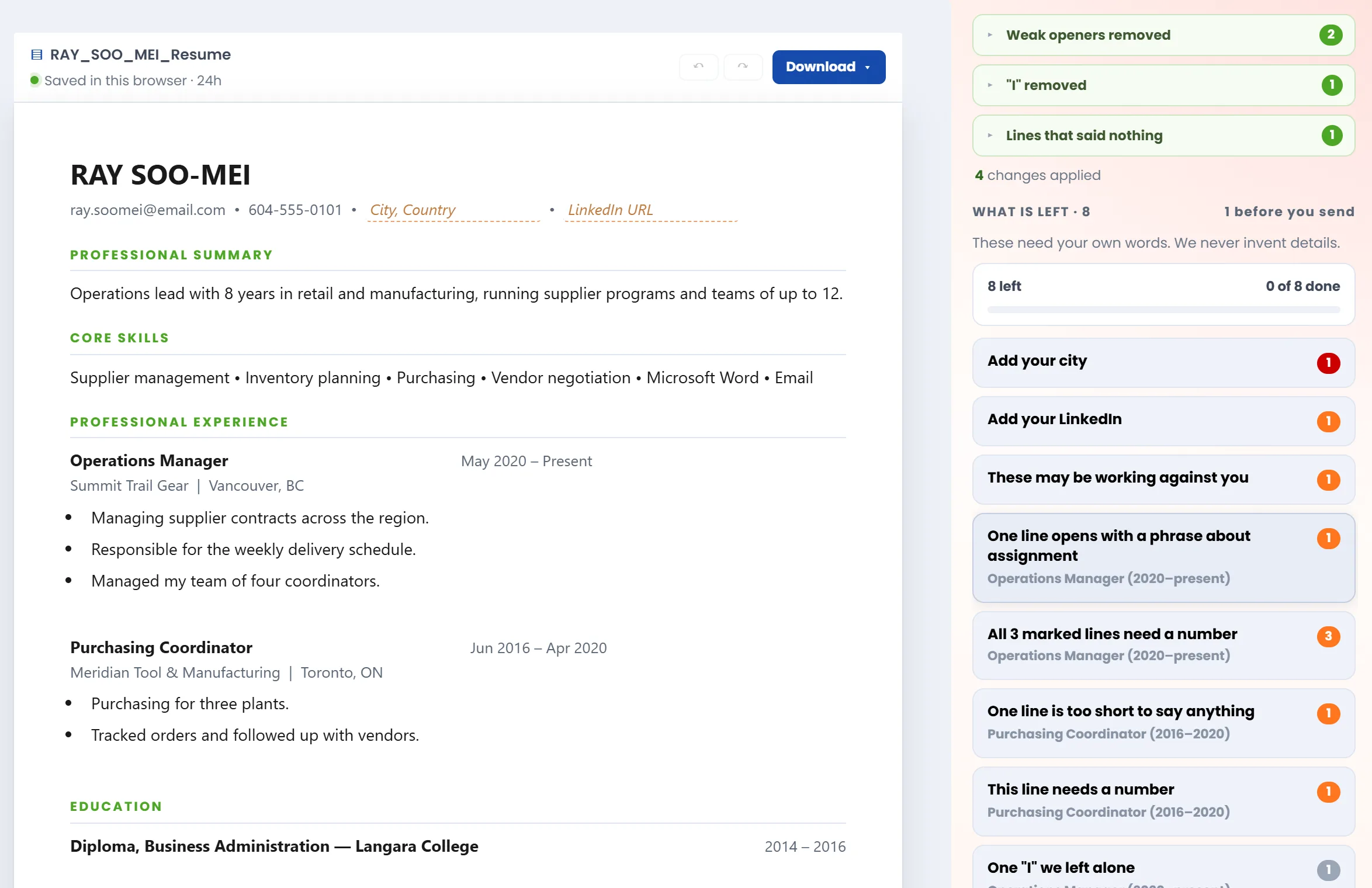
- 1What it fixed for you. Weak openers, a stray "I", a sentence that said nothing. Each one can be put back.
- 2What only you can fix. Your city, your LinkedIn, the numbers. Click a note and it lights the line.
- 3Your resume, still yours. One clean column, every line editable, ready to download.
It never adds a job, a number, or a skill you didn't give it. Where something's missing, it asks you. Every line stays editable, so you can overrule anything it did.
It's also free, and free all the way through the download: no sign-up, no account, no card. The whole thing runs inside your browser, so there's nothing for us to meter. Your resume never reaches our servers, and our privacy policy spells out exactly what the tool keeps in your browser and for how long. Your career history stays yours.
What a Recruiter Reads in the First 7 Seconds
The Ladders study tracked where recruiters' eyes went, and it matches what I do almost exactly.
Current job title and employer. Then the previous one. Then across to the dates. Then down to education (or a required certification, e.g., in trades or nursing). That's the scan.
If I can find those four things fast, I keep reading. If I can't, the resume has already lost something it didn't need to lose.
The same study found that resumes with simple layouts, clear section headings, and bulleted accomplishments did well. Cluttered layouts, multiple columns, long sentences, and missing headers did badly. Nobody rejects you for a two-column design. But a design that makes the scan harder is working against you in the only seconds that count.
Here's the part most resumes get wrong: consistency matters more than style. When one job reads title, then company, then dates, and the next job reads company, then dates, then title, I have to re-learn your resume at every entry. The cleanup lays out every job the same way, with your title first, then the employer, and the dates in the same place each time. If it mixes up a title and an employer on one job, there's a swap control on that job to flip them back.
Can an ATS Read Your Resume?
Usually, but not the way you'd think. An applicant tracking system reads the text inside your file, not the design you see on screen. Columns, text boxes, tables, emojis, and spaced-out headings can scramble that text or drop it. If the software can't find your job titles, a recruiter searching the system may never see you.
An ATS (applicant tracking system) is the software employers use to collect, store, and search applications. Before it can search your resume, a part of it called a resume parser has to pull your name, jobs, dates, and skills out of the file. When the parser gets it wrong, you're filed under the wrong things, or under nothing at all. If the job requires 5 years of experience but the parser couldn't determine your years of experience due to parsing error, then your application gets filtered out and into the reject list.
Employers know this costs them good people. In Harvard Business School's Hidden Workers study, 88% of employers agreed that qualified, high-skill candidates get vetted out because they don't match the exact criteria in the job description. And with auto-apply bots flooding hiring pipelines, the pile your resume lands in is deeper than it's ever been.
We learned how fragile this is while building the cleanup. A PDF doesn't store paragraphs. It stores where each character sits on the page.
A heading with wide letter spacing came back as "P R O F E S S I O N A L E X P E R I E N C E." In our own tests, a resume with letter-spaced headings looked perfect on screen and came back with zero jobs found.
- Led shifts on a 32-bed surgical unit
P R O F E S S I O N A L  E X P E R I E N C E
Registered N urse
Lakeside General Hospital · 2019 to present
• Led shifts on a 32-bed surgical unit
So how do you check your resume for ATS problems before you apply? Start with the ten-second test in the file section below.
Then let the cleanup do three things. It reads your file and rebuilds it as one column with standard headings. It joins the split words back together. And when it can't read part of your file, it tells you what's missing instead of quietly dropping it.
If you want the most reliable result, paste the text in. Pasting skips the PDF problem entirely.
Should You Use "I" on a Resume?
No. Resume convention drops personal pronouns and starts each line with an action verb, so the reader sees what you did first. "I managed the budget" becomes "Managed the budget." The same goes for openers like "Responsible for," which describe what you were assigned rather than what you did.
Harvard's career office puts personal pronouns on its "don't" list and tells students to start each line with an action verb. I'd go further on "Responsible for." When I read it, I learn what was on your job description. I don't learn whether you did it, or how well.
I built the cleanup to rewrite these for you, carefully. Four real patterns, and what it does with each:
I managedthe teamManaged the team✓ RewrittenResponsible formanaging vendor contractsManaging vendor contracts✓ Rewritten- Responsible for the monthly closeLeft as writtenFlagged for you
- Managed my team of fourLeft as writtenFlagged for you
Why leave two alone? Cutting "Responsible for" from "the monthly close" turns a sentence into a caption. And changing "my" would change whose team it was. That's your call, not ours.
Why so careful? Because a fix that makes a line worse reads like carelessness, and the recruiter blames you for it, not the tool.
Which Resume Words Make Recruiters Stop Reading?
Clichés that anyone could claim: "team player," "hard worker," "results-driven," "go-getter," "think outside the box." In a CareerBuilder survey of 2,201 hiring managers, "best of breed" topped the list of worst resume terms. These words take up the space where your proof should be.
The rest of the top of that list, from the CareerBuilder survey, run by Harris Poll, will look familiar. If one of these is in your summary right now, you're in crowded company:
My take is simpler. Everyone says they're a team player. Nobody writes "hard to work with." So the phrase tells me nothing, and my eyes slide right past it looking for something real.
The same goes for filler skills. "Microsoft Word," "Email," and "Internet" in a skills list don't say you're capable. They say the list ran out of things to say.
So what does the cleanup do with a cliché? It depends on what's standing next to it.
In your summary, a sentence that's nothing but cliché ("Hard-working team player with a strong work ethic.") is removed, and the note beside it lets you put it back. But a sentence like "Results-driven sales leader who grew revenue 35%" stays. The number is worth more than the adjective costs, so the cleanup flags the phrase by name and leaves the rewrite to you. It also flags skills everyone is assumed to have.
Every Bullet Needs a Number, and No Tool Should Invent One
This is the single biggest gap I see. Most bullets describe duties. Duties tell me what the job was. Results tell me what you were like in it.
Compare these two, from the same job:
Before: Managed the company's social media accounts. (a duty)
Grew followers from 2,000 to 11,000 in 12 months across 4 accounts
- 1. What you didA verb that names the action: grew, cut, built, led.
- 2. What changedThe thing that was different because of you.
- 3. By how muchThe number. This is what a recruiter's eye stops on.
- 4. The scaleTime, size, or volume, so the number means something.
Same job. The second one gets a phone call. (Every bullet in the works this way.) Harvard's guidance says it plainly: quantify where possible. Counts, dollars, percentages, time saved, people served, team size. Almost every job has a number in it somewhere.
The cleanup marks the lines with no number and asks you a question about each one, one note per job so you're not buried in repeats.
What it will never do is make one up. Plenty of AI tools will happily turn "helped customers" into "improved customer satisfaction by 35%." It reads great until the interviewer asks how you measured it. A guess on a resume is a question you can't answer in the room.
How Long Should a Resume Be? One Page or Two?
A one page resume if you have under five years of experience, and up to two pages if you have more. Recruiters don't punish a second page that earns its space; they punish padding. A summary of two to four sentences and a focused set of bullets per job usually does more than a longer list.
The one-page rule is weaker than you've probably been told. In a ResumeGo study of 482 hiring professionals, recruiters were 2.3 times as likely to prefer two-page resumes over one-page resumes. I care whether every line is doing work, not how many pages it takes.
Two spots run long more than any others. The summary, which should say who you are, what you do, and how long you've done it, in what Indeed's resume advice puts at no more than three to four sentences. And the bullet list under a job, where eight or nine duties blur together until nothing stands out. Across 291 real resumes we tested, 1 in 5 had at least one job with more than 8 bullets.
| Your experience | Under 5 years | 5 years or more |
|---|---|---|
| Pages | 1 page | Up to 2 pages |
| Summary | 2 to 4 sentences: who you are, what you do, and for how long | |
| Bullets per job | 3 to 6, with the most under your latest role | |
| Skills | 5 to 10 concrete ones, grouped under your own labels if you have more | |
| The cleanup flags these and never cuts: a summary of 6+ sentences, a job with more than 8 bullets, a skills group over 14, and a document past the page count for your experience. | ||
Here the cleanup flags and never cuts. You'll see a note when your summary runs long, when a job lists more than 8 bullets, or when the whole document runs past the usual length for your experience. It won't remove a word to make it fit, because what matters most depends on the job you're applying for. It also keeps your skills grouped the way you wrote them, with no cap on how many you list.
What Goes at the Top of Your Resume, and What Never Does
The top of your resume has one job: tell me who you are and how to reach you. You'd be surprised how many resumes fail at that. I've seen strong candidates with no phone number, no city, or an email address from 2004 that I'd hesitate to forward to a hiring manager. A motivated recruiter who finds a strong candidate will contact them by phone and email and get the interview scheduled ASAP.
What belongs there
- Your name, as the biggest thing on the page.
- An email address that's some version of your name.
- A phone number. If the role is client-facing, a quick phone call is the first line of contact to assess your communication skills before a formal interview is booked.
- Your city and state or province. Recruiters filter by location. Skip the street address.
- Your LinkedIn URL, if the profile is filled in. The chart below shows why that condition matters.
What never belongs there
Date of birth, age, marital status, religion, nationality, a photo, or a Social Security or Social Insurance number. In the US and Canada, none of these are expected, and several are things an employer isn't allowed to weigh. Federal law protects applicants 40 and over from age discrimination, so a birth date hands the reader something they have to work to ignore. Don't make them.
The cleanup checks the whole contact line. It flags a missing email, phone, city, or LinkedIn, and suggests a plainer email if yours might read as informal. A date of birth in your summary, bullets, or a personal-details section is removed, and the cleanup tells you why. If one is buried in your summary, it removes just that sentence and keeps the rest.
Will a Gap on Your Resume Get You Screened Out?
It can, before a person ever sees it. Harvard Business School found that almost half of the companies it surveyed screened out resumes with a work gap of more than six months. One honest line explaining the gap won't beat every filter, but it answers the recruiter who does read it.
The Hidden Workers report is blunt about why: the filters can't tell a difficult pregnancy from a layoff. They just prefer no gap at all. That's unfair, and it's also the system you're applying into.
From my side, a gap I can see and can't explain is a question. A gap with one line under it isn't. Caring for a parent, finishing a degree, a contract, an illness, relocating for a partner's job. You don't owe anyone detail. One line is enough.
You're also far from alone. In LinkedIn's survey of nearly 23,000 workers and 7,000 hiring managers, 62% of employees had taken a career break. And 51% of employers said they'd be more likely to call a candidate back if they knew why.
Your dates are all the cleanup needs to spot a gap. It tells you how long each one is and where it falls. It does the same when you have two or more roles under 18 months in a row, since short stays invite the same question. It can't write the explanation for you. Only you know it.
PDF or Word: Which Resume Format Should You Send?
Send whatever the job posting asks for. If it doesn't say, a Word file is the safe choice for online application systems / ATS (e.g., Greenhouse, Lever, BambooHR), and a PDF is fine by email as long as its text is real and selectable. As for how to name your resume file: use your own name, like Jane_Smith_Resume.pdf, never resume_final_v3.
Here's a ten-second test for any PDF: open it and press Ctrl+A (Cmd+A on a Mac). If the text highlights, software can read it. If nothing highlights, your resume is a picture of a resume, and an ATS sees a blank page. That's what a scan or a photo gives you: as Adobe's Acrobat help page puts it, you can't copy text out of an image.
The file name matters more than you'd think. When I download fifty applications, "resume.pdf" disappears into a folder with forty-nine others. Your name in the file name means I can find you again.
The cleanup's Download button gives you all three formats from the same document:
- PDF, built through your browser's print engine, so it has a real text layer and no letter-spaced headings.
- Word (.docx), with proper named styles, so you can restyle it in Word or Google Docs.
- Plain text, for pasting into application forms.
Every file is named with your name, like Jane_Smith_Resume. One less thing to remember.
How to Clean Up Your Resume in Five Minutes
To fix your resume in five minutes, open Ready to Apply's free Resume Cleanup, upload or paste your resume, and click Clean it up. Read the notes beside your document, fix what only you can fix, and download it as a PDF, Word, or text file. No account, no card, and your resume stays in your browser.
Upload or paste your resume
Open the Resume Cleanup and choose a Word file, PDF, or text file, or paste the text in. Pasting is the most reliable, because it skips the PDF problem. If you upload something that isn't a resume, like a reference form, it tells you.
Click Clean it up
In a few seconds you get your resume back in one clean column. The automatic fixes are done: pronouns and weak openers rewritten, a date of birth in your summary, bullets, or a personal-details section removed, every job in the same order, spacing and punctuation tidied without touching your numbers.
Read the notes beside it
Each note points at a line in your document: a bullet that needs a number, a gap to explain, a missing city, a cliché in your summary. Click a line to find its note. Fix the ones that matter for the jobs you're chasing and skip the rest.
Edit anything
Every line is editable, including headings and job titles. Add or delete bullets, add a section, remove one, or drag sections into a different order. Undo and redo work the way you'd expect. If you disagree with a change the cleanup made, put it back.
Download it
Pick PDF, Word, or text. The download carries your words and nothing else: none of the notes or editing controls. Your working copy stays saved in that browser for 24 hours after your last change, so you can come back to it.
Two things the cleanup won't do, on purpose. It won't write content for you, because an invented detail is one you'd have to defend. And it won't tailor your resume to a specific job, because it has never seen the job. That's a different step, and it's the next one.
The Bottom Line
Most resumes fail on friction, not experience: a layout software can't read, lines that describe duties instead of results, a summary full of words nobody believes, a missing city, a gap nobody explained. Every one of those is fixable, and most of them take minutes.
So fix your resume in two steps. First, make it clean: run it through the free Resume Cleanup, answer its questions, and download the result. Then make it fit.
The resume keywords that matter are the ones in the posting you're applying to, so no cleanup can add them for you. For each job you're serious about, get your Job Fit Score to see what matched, what didn't, and what to fix before you apply. Our post on tailoring your resume to a job description walks through that second step in full.
A clean resume won't get you every job. It will get you read. That's the part you control, so take it.