
Job search is hard. I built Free Resume Cleanup because I've watched it get harder from the other side of the desk, and I think a big part of it can be fixed.
I love recruitment. I love the moment a resume shows me, in a few seconds, that this person can do the job. But I've also sorted through thousands of resumes in every format you can imagine: two columns, skill bars, three fonts, job titles buried in paragraphs, dates written four different ways. What I needed was usually in there somewhere. I just had to dig for it.
Every recruiter knows that pain. There's no standard way to lay out a resume, so we spend our time searching instead of reading.
If you're job hunting, you have a pain of your own. Before a recruiter sees your resume, software often reads it first: an applicant tracking system (ATS), and more and more often an AI that pulls it apart into fields. If your resume breaks the conventions those systems expect, parts of it can come through scrambled or not at all. That can cost you an interview you were qualified for, and nobody tells you why.
I built Resume Cleanup to close that gap, and I made it free. Here's what it does and how it stacks up.
What Is Free Resume Cleanup?
Free Resume Cleanup is a Ready to Apply tool that takes the resume you already have and rebuilds it into a clean, standard structure, right in your browser. It fixes what it safely can, flags what needs your own words, and never invents a job, a number, or a skill.
Here's what you can use today:
- Paste or upload a PDF, Word file, or plain text, and click Clean it up.
- Get it back in a standard structure: plain headings, one column, and every job as title, employer, and dates.
- "I" and weak openers get rewritten, and personal details like a date of birth come out. Your numbers stay exactly as you wrote them.
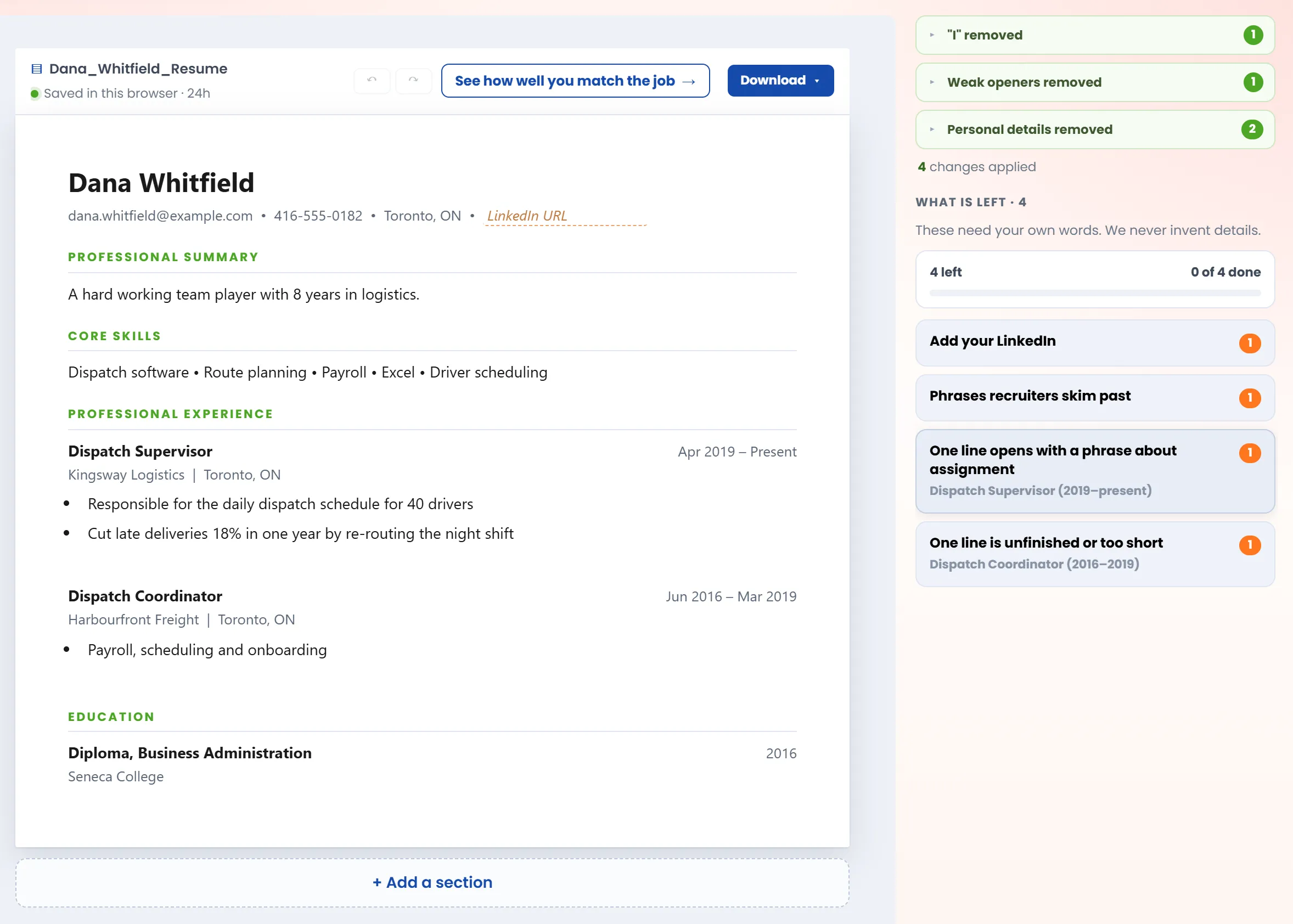
- Notes in the margin point to what only you can fix, like a bullet with no result or a missing city.
- Edit anything. Change a line, fix a whole job in one form, add or move sections, undo.
- Open the RTA Resume Guide™ in the next tab to see what each section is for, written by a recruiter.
- Download it as a PDF, Word file, or plain text, already named with your name.
- It all runs on your device, and your resume never gets uploaded. Our privacy policy has the details.
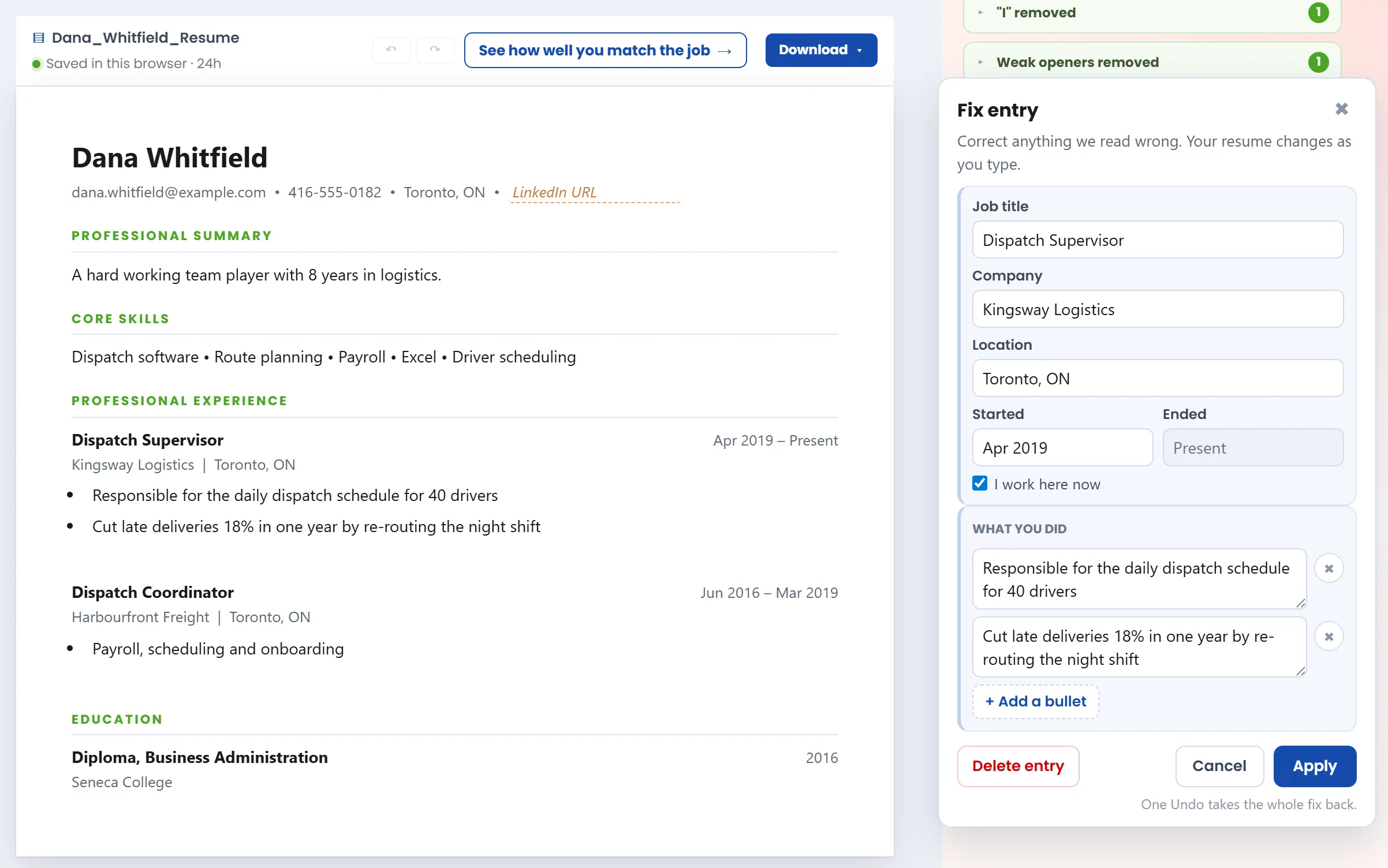
Click the ✎ beside a job and the whole entry opens in one form. Your resume changes as you type.
The reasoning behind every fix is in my resume checklist.
The Biggest Misconception About Resume Writing
For the longest time, job seekers were told to stand out. Design your resume to be eye-catching, so a hiring manager instinctively picks it up out of a sea of black-and-white blocks of text. Make the content personally unique, and use every creative avenue in copywriting and formatting you can find.
That may have been true ten years ago, when resumes were dropped off, mailed, or emailed straight to hiring managers and internal recruiting teams. They got printed, tucked inside a folder, and handed out during in-person interviews.
Things have changed. The recruiting workflow has pivoted to structured data: before a person reads your resume, software pulls it apart into fields it can sort and search, like your name, job titles, employers, and dates. Jobscan found an ATS at 97.4% of Fortune 500 companies. And in Harvard Business School's Hidden Workers study, 88% of employers agreed that qualified candidates get screened out for not matching exact criteria.
Your creativity is now working against you. The columns, icons, and inventive headings that catch a person's eye are exactly what the software misreads. The most ironic part about building Ready to Apply is that after months of tweaking, refining, and upgrading the code base to improve how it parses and reconstructs my own resume, it still hasn't done a good enough job to clean it up. Job titles were dropped, dates got mixed up, core skills with bullets that turn into run-on sentences, etc. I tried to be creative in creating my resume by using a Canva template, and if I were to send my resume PDF as it is to a job application that utilizes an ATS... Knowing what I know now, I wouldn't be surprised if it got rejected instantly. I've created a true resume structure edge case that even my own tool is having trouble parsing.
Standing out can still help if you're applying in person and you know a human will be reviewing printed resumes by hand. I know a People and Culture VP who calls herself "old school" and still prints every single applicant's resume individually so she can manually screen them, even though she works at a multi-site organization with a three-digit headcount that recruits all the time.
What Makes a Resume Easy for Recruiters and ATS to Read?
Structure. Standard section headings, one column read top to bottom, every job written as title, employer, and dates in the same order, dates in one format, and a file made of real text. A recruiter finds what they need in seconds, and tracking software files each part where it belongs.
Both readers move fast. In Ladders' eye-tracking study, recruiters spent 7.4 seconds on a first look, and cluttered, multi-column layouts did worst.
Small details do real damage. One Reddit user who spent eight months testing how ATS platforms read resumes reported candidates with eight years of experience showing up with three. Their dates were written several ways in one resume: "Jan 2019," "2019-01," "January '19." The same tester found Word files parsed reliably on Workday, Greenhouse, and iCIMS, while PDFs had edge-case failures.
That's the gap. A strong career in a hard-to-read layout can lose to an average one in a clean layout. Resume Cleanup gives every resume the same clean shape, so recruiters and software can both find what they're looking for.
How Does Resume Cleanup Read Resumes Other Parsers Get Wrong?
A parser is the part of any resume tool that reads your file and works out what's a heading, a job, or a date. Many parsers assume a simple one-column file. Resume Cleanup reads where each word sits, follows the layout you used, and keeps whatever it can't place.
I'll keep our recipes to ourselves (for now), but here's what a basic parser can make of a few common resume habits, and what Resume Cleanup reads instead.
| On your resume | What a basic parser can read | What Resume Cleanup reads |
|---|---|---|
| "Registered Nurse" in a PDF | Registered N urse | Registered Nurse |
| A heading in small caps | W ORK E XPERIENCE, not a heading | WORK EXPERIENCE, a heading |
| A sidebar on the left | Sidebar lines mixed into your jobs | Each column read in one piece |
| A Word file held together by line breaks | One long line, no jobs found | Every line where you put it |
| A line the parser doesn't recognize | Gone, without a word | Kept, at the end of your resume |
Words come back whole. A PDF stores scraps of text and where to draw them, and a font change can cut a word in two. Open Resume, a popular open-source resume parser, joins scraps that sit closer than an average character's width. But many PDFs leave out the spaces between words, so that rule also glues real words together. Resume Cleanup reads the spacing on the page itself, so it rejoins split words without gluing the others together.
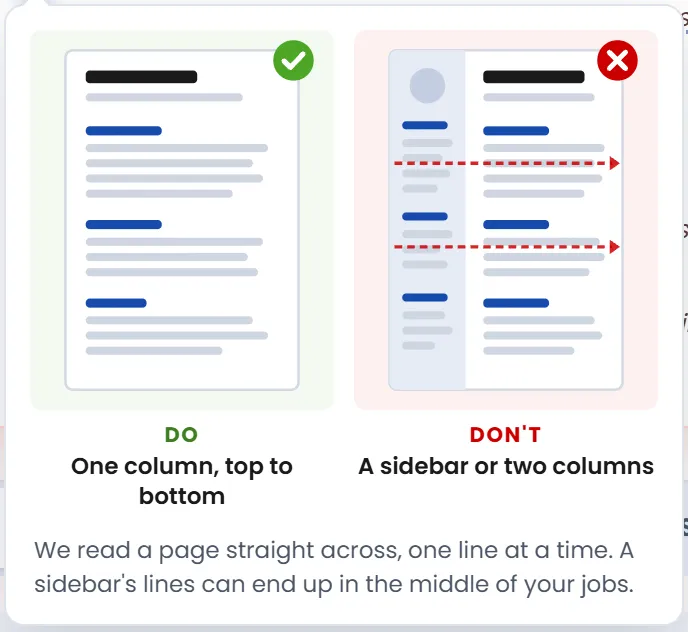
Columns stay in order. Open Resume's own page says its parser is designed for single-column resumes in English. Plenty of real resumes have a sidebar (including my own). In Enhancv's 357-run test of two-column resumes, the weakest way of reading a PDF kept sections intact only 35% of the time, against 60% for one column. When a PDF with a left-hand sidebar mixes the columns line by line, Resume Cleanup reads the main column first, then the sidebar.
Every change is tested on hundreds of real resumes before it ships, and we read every resume a change makes worse.
What Are Resume Cleanup's Limitations?
Resume Cleanup runs entirely in your browser. That keeps your resume private, but it means no AI model rewrites or rearranges your content. It reads most formats and templates well, not all of them. When it can't place something, it keeps the line, tells you, and shows you how to fix the layout.
Privacy has a price, and I'd rather tell you what it is. An AI model could guess where a stray line belongs or untangle a scrambled sidebar. But that would mean sending your resume to a server and paying for every run.
I chose to keep your resume on your device, so Resume Cleanup works by rules instead. Rules have edges, and they struggle with nuance. Here's where you might hit them:
- A sidebar on the right, or columns that change from page to page, can still come through out of order.
- Text inside images or graphics can't be read at all. A scanned PDF is a picture of a resume, with no text in it to copy.
- Creative headings, like "My Journey" instead of "Experience," can hide a whole section.
- Unusual date styles, like "2019-01" or "January '19," can throw it off, and a mix of styles in one resume is the hardest case. Write every date as "Jan 2019" and it reads them cleanly.
- It won't rewrite your bullets or write new ones. It fixes what it safely can and leaves the rest to you.
- It takes resumes up to 2,000 words and files up to 3 MB.
I'll say it plainly: no tool parses every resume correctly. Not ours, and not the ones you pay for. As a recruiter, I reviewed thousands of resumes in the pre-AI era, and they came in countless structures. Each one reflects the candidate's personal journey, and often their desire to be unique, to stand out. Our aim is to read most of the formats and templates out there, and to be straight with you when we can't.
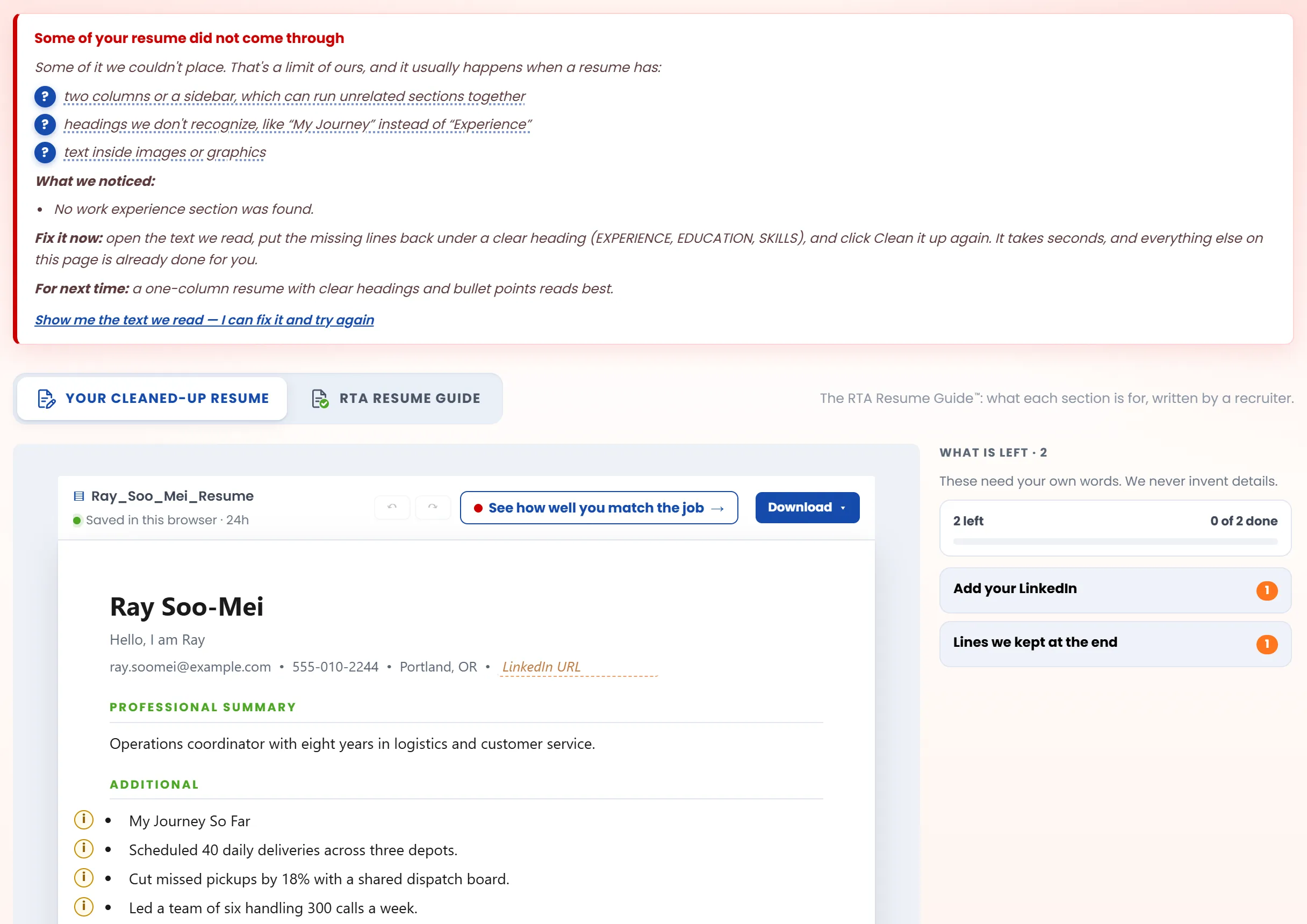
That panel is also where the coaching starts. Click a ? and you get a picture of what reads well and what doesn't. The notes in the margin and the RTA Resume Guide do the same for every section. They show you how to present your work history so a recruiter, and the software in front of them, can follow it.
From a Clean Resume to a Job Match
Cleaning up your resume is step one. Step two is checking it against the job you want, and that's built in.
Click "See how well you match the job"
It sits beside Download ("Match a job" on a phone) and on the "All done" card when you finish your notes. It takes you to a job description box at the bottom of the page.
Add the job posting
Paste it, upload a PDF or Word file, or drag it in. Just the role: the title, location, responsibilities, and requirements.
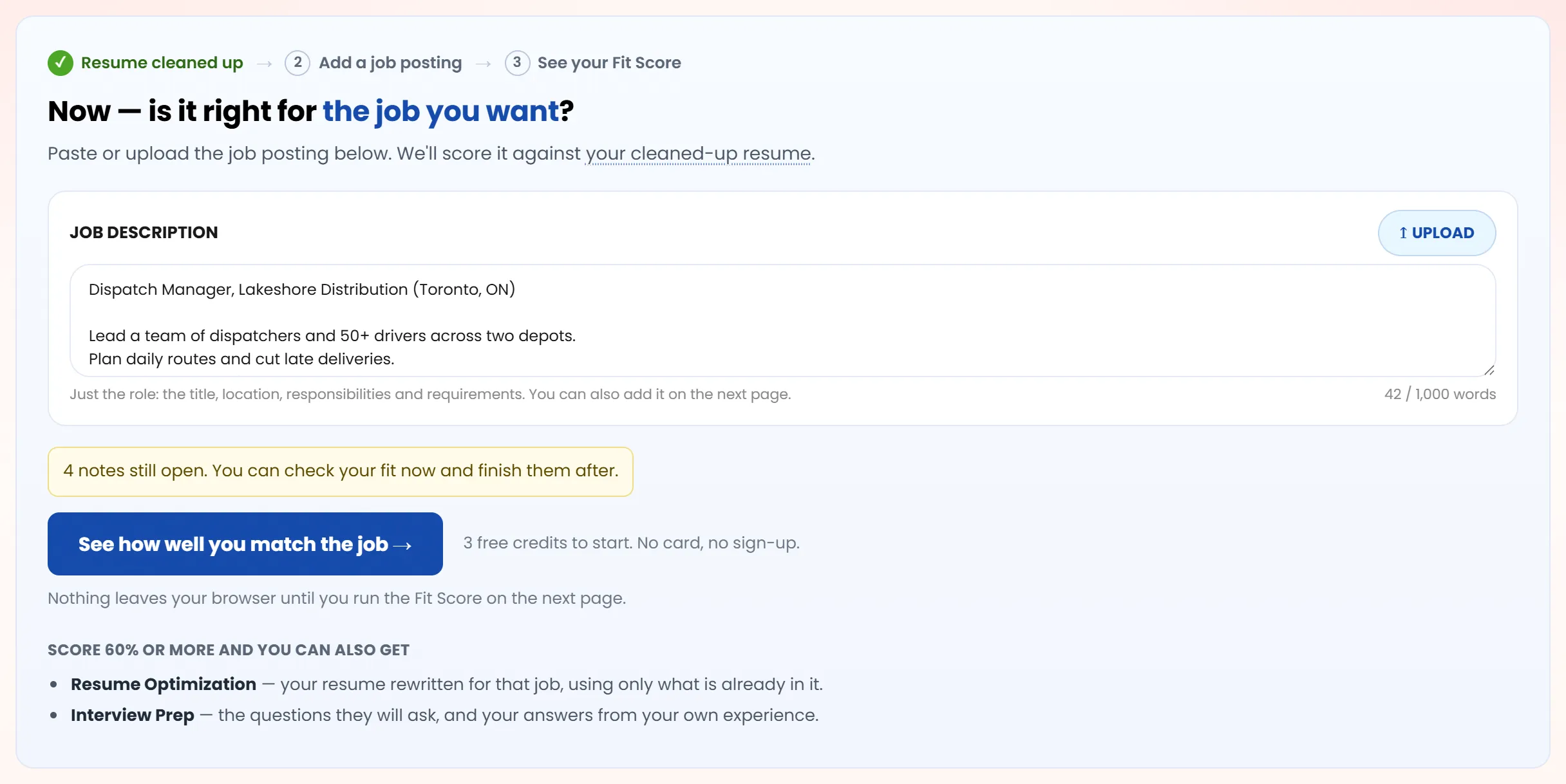
Run your Fit Score
Click the button under the box. The Fit Score opens with your cleaned-up resume and the posting already filled in, ready to show what matched, what didn't, and what to fix before you apply.
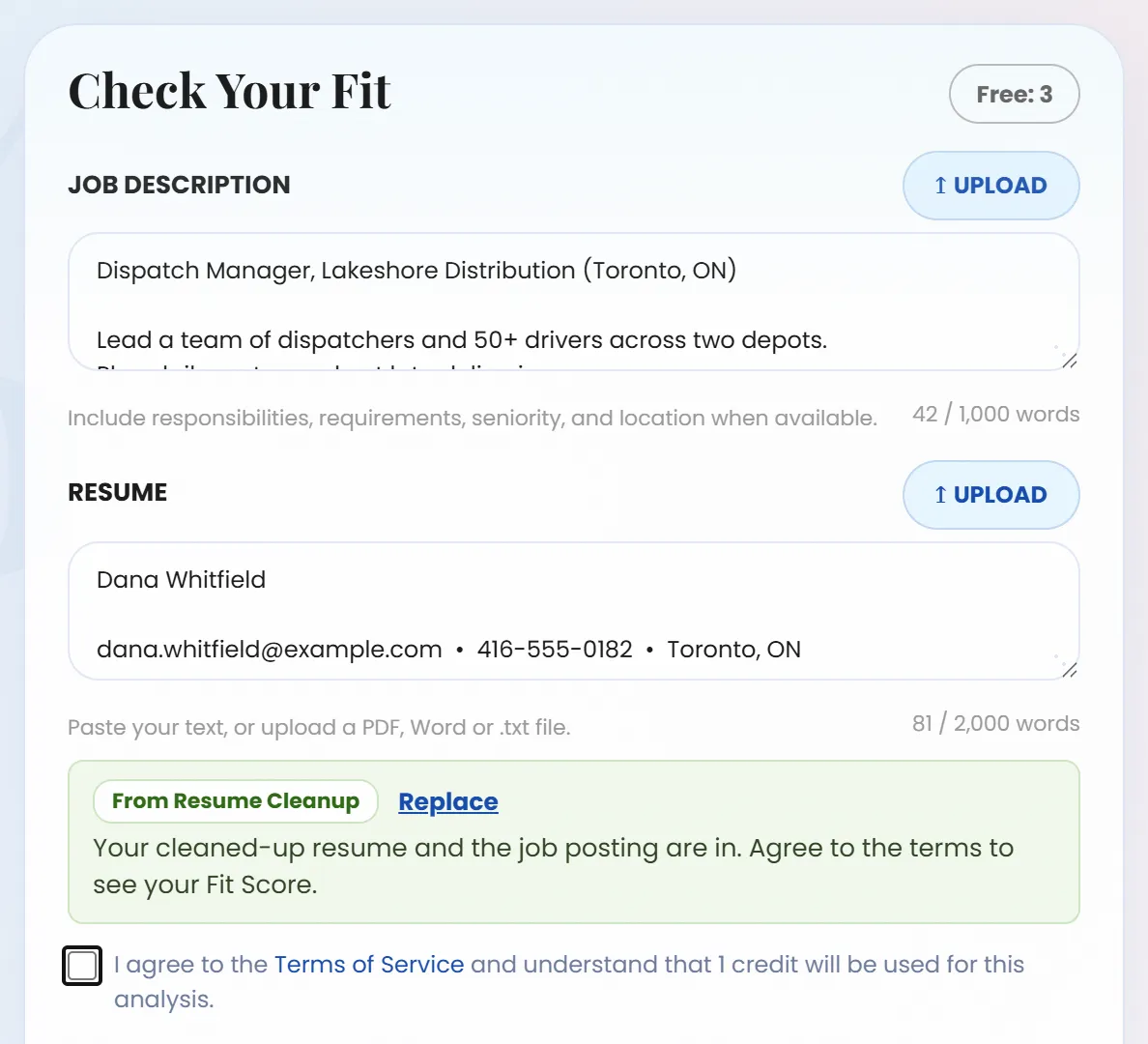
It uses one credit, and you get 3 free credits to start, with no card and no sign-up. If part of your resume didn't come through, the page suggests fixing that first, but it never blocks you. Nothing leaves your browser until you run the Fit Score.
Is a Free Resume Tool as Good as a Paid One?
It can be. A price tells you how a tool makes money, not how well it reads your resume. Judge any resume tool, free or paid, on four things: what it costs at the end, where your resume goes, whether it writes content for you, and whether it admits what it missed.
I haven't tested every paid tool, and I won't claim a win I haven't measured. Here's how Resume Cleanup answers those four.
- What does it cost at the end? Nothing. No sign-up, no card, no payment screen at the download. The FTC has warned about sites that hide part of the price until late in the process.
- Where does your resume go? Nowhere. It's read on your own device, PDFs included (with Mozilla's open-source PDF reader), and never uploaded. Uploaded resumes can leak: in 2025, researchers found more than 5.1 million files, mostly resumes, left open online by one resume platform. More on why we don't store your data.
- Does it write content for you? No. It never invents a job, a number, or a skill. In a 2026 Robert Half survey of more than 2,000 hiring managers, 65% said a surge of AI-assisted applications had made skills harder to verify. A line you didn't write is a line you'll have to defend.
- Does it admit what it missed? Yes. When it spots that part of your file didn't come through, it says so and names the likely cause.
Then run your resume through Resume Cleanup and whatever you're paying for, side by side, and judge for yourself.
Why I Made It Free
Resume Cleanup runs in your browser, on your device, so it costs us almost nothing to run. No API calls, no tokens spent, no LLM attached in the backend. That's what lets it stay free, always. The Fit Score, Resume Optimization, and Interview Prep are different: they run on a powerful AI model, each run has a real cost, and we price them as close to that cost as we can.
The other reason is personal. I love recruitment, and I want this tool to help both sides of the desk. Job seekers get a resume that gets read, and recruiters spend less time digging.
Paste your resume into Free Resume Cleanup and see what comes back. If it helps you land one interview you'd have missed, it did its job.